why care
Ollama, LM Studio, MLX, sidekick.nvim; all of these split unified memory between CPU and GPU. Darwin is conservative with GPU allocation by default. 7B models run fine. try loading a 70B GGUF or large MLX model; layers spill to CPU. tok/s tanks.
bro just buy an NVIDIA GPU
no. In Darwin, we don't do that here.
the command
set wired memory limits. powers of two.
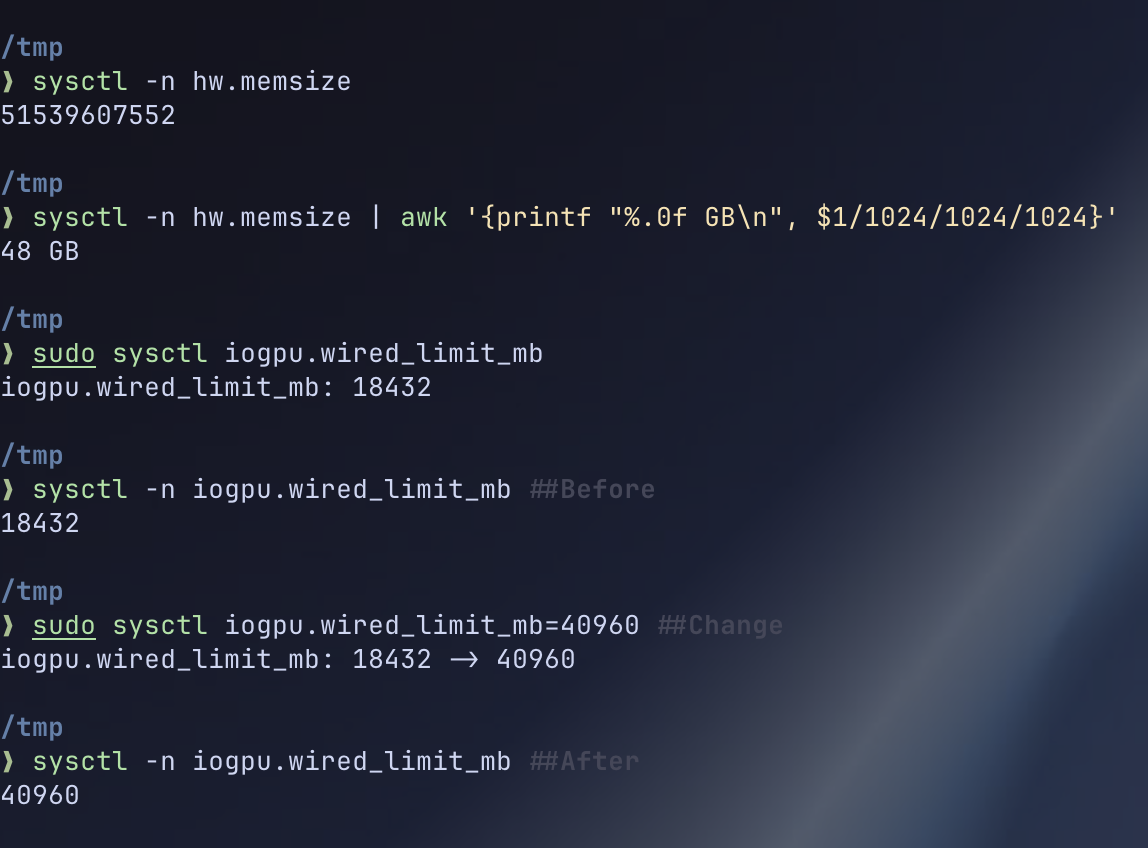
sudo sysctl iogpu.wired_limit_mb ## check current limit
set it:
sudo sysctl iogpu.wired_limit_mb=8192     ## 8GB
sudo sysctl iogpu.wired_limit_mb=16384    ## 16GB
sudo sysctl iogpu.wired_limit_mb=32768    ## 32GB
sudo sysctl iogpu.wired_limit_mb=65536    ## 64GB
feel it:
dont set it equal or more than total unified memory, or your os MIGHT crash
cheat sheet
| Unified Memory | Safe Limit | Command |
|---|---|---|
| 8GB | 6144 MB | sudo sysctl iogpu.wired_limit_mb=6144 |
| 16GB | 12288 MB | sudo sysctl iogpu.wired_limit_mb=12288 |
| 24GB | 18432 MB | sudo sysctl iogpu.wired_limit_mb=18432 |
| 32GB | 24576 MB | sudo sysctl iogpu.wired_limit_mb=24576 |
| 36GB | 28672 MB | sudo sysctl iogpu.wired_limit_mb=28672 |
| 48GB | 40960 MB | sudo sysctl iogpu.wired_limit_mb=40960 |
| 64GB | 57344 MB | sudo sysctl iogpu.wired_limit_mb=57344 |
| 96GB | 81920 MB | sudo sysctl iogpu.wired_limit_mb=81920 |
| 128GB | 114688 MB | sudo sysctl iogpu.wired_limit_mb=114688 |
| 192GB | 163840 MB | sudo sysctl iogpu.wired_limit_mb=163840 |
75-80% of total memory. rest is for Darwin.
persist across reboots
sysctl resets on reboot. fix it.
option 1: launchd (recommended)
sudo nano /Library/LaunchDaemons/com.user.iogpu.wiredlimit.plist
<?xml version="1.0" encoding="UTF-8"?>
<!DOCTYPE plist PUBLIC "-//Apple//DTD PLIST 1.0//EN" "http://www.apple.com/DTDs/PropertyList-1.0.dtd">
<plist version="1.0">
<dict>
    <key>Label</key>
    <string>com.user.iogpu.wiredlimit</string>
    <key>ProgramArguments</key>
    <array>
        <string>/usr/sbin/sysctl</string>
        <string>iogpu.wired_limit_mb=32768</string>
    </array>
    <key>RunAtLoad</key>
    <true/>
    <key>StandardOutPath</key>
    <string>/var/log/iogpu-wiredlimit.log</string>
    <key>StandardErrorPath</key>
    <string>/var/log/iogpu-wiredlimit.err</string>
</dict>
</plist>
load it:
sudo chown root:wheel /Library/LaunchDaemons/com.user.iogpu.wiredlimit.plist
sudo chmod 644 /Library/LaunchDaemons/com.user.iogpu.wiredlimit.plist
sudo launchctl load /Library/LaunchDaemons/com.user.iogpu.wiredlimit.plist
boots every time. done.
option 2: .zshrc (lazy)
_ai_bump_wired_limit() {
  local target_mb=32768
  local current_mb
  current_mb=$(sysctl -n iogpu.wired_limit_mb 2>/dev/null || echo 0)

  if [ "$current_mb" -lt "$target_mb" ]; then
    sudo sysctl iogpu.wired_limit_mb="$target_mb"
  fi
}

ollama() {
  _ai_bump_wired_limit
  command ollama "$@"
}

lms() {
  _ai_bump_wired_limit
  command lms "$@"
}
LM Studio
LM Studio; easiest way to see the difference. check GPU layers before and after.
- close LM Studio
- run
sysctlcommand - reopen, load same model
- watch layers shift to GPU
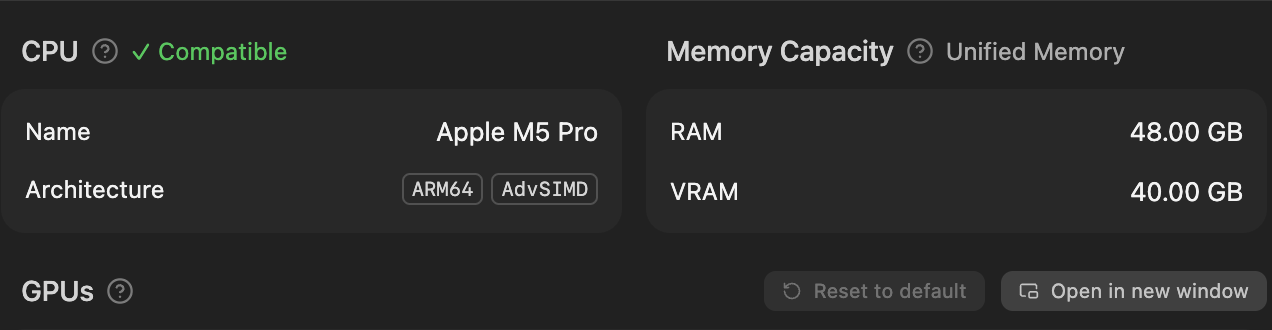
on my m5 pro with 48GB unified, iogpu.wired_limit_mb=32768; went from ~15 GPU layers to full offload on Q4_K_M 70B. tok/s difference was stupid.
Felt like I upgraded hardware without spending a cent.
Ollama
Ollama auto-detects available VRAM. set limit, restart.
sudo sysctl iogpu.wired_limit_mb=18432
ollama stop
ollama serve
verify with:
ollama ps
processor column: GPU instead of CPU/GPU split. that's the move.
local AI tooling
more VRAM means you can run bigger models for everything; inline completions with things like sidekick.nvim, local chat, agentic workflows, the works. no telemetry && no restrictions.
My wallet thanks apple for unified memory. My sanity does not thank apple for the price of the RAM upgrade.
MLX
MLX enjoyers; this is where it gets nasty. apple's own ML framework. designed for unified memory. wired limit + MLX = peak performance.
uvx mlx-lm
mlx_lm.generate --model mlx-community/Meta-Llama-3.1-8B-Instruct-4bit --prompt "tell me about unified memory"
native Metal API. no translation layers. raw apple silicon.
the fun stuff
disclaimer: i am not a hacker. i am not a security researcher. i am a dev who experiments with stuff for fun and learning. everything here runs against my own infrastructure. dont be stupid with this. if you break into someone else's stuff thats on you, not me.
alright this is where it gets interesting. more VRAM means you can load uncensored models locally with zero cloud dependency. here's what I run.
jailbroken models + custom sandbox
i use Ollama with jailbroken/uncensored models inside a sandboxed podman container. purely for experimenting and poking at my own homelab infra. the setup:
ollama pull dolphin-llama3:8b          ## uncensored model
ollama pull dolphin-mixtral:8x7b       ## bigger uncensored MoE
these models have no alignment filters. use responsibly. or dont. I'm not your dad
the sandbox is a podman container with network isolation, controlled egress, and firejail inside. the LLM has tool-use access to:
nmap/masscanfor port scanningsqlmapfor injection testinggobuster/feroxbusterfor directory enumerationcurl/httpxfor HTTP probing- custom python scripts for payload generation
i also feed the model a custom CVE index; basically a curated local database of CVEs that the AI can search and cross-reference while probing. it uses this to identify known vulnerabilities in whatever service its scanning and suggest relevant exploits. think of it as giving the model a cheat sheet of every known vulnerability so it doesn't have to hallucinate attack vectors.
podman run --rm -it \
  --network=pentest-net \
  --cap-drop=ALL \
  --security-opt=no-new-privileges \
  -v ./tools:/tools:ro \
  -v ./cve-index:/cve:ro \
  pentest-sandbox /bin/zsh
the LLM generates attack vectors, writes nmap scripts, crafts payloads, and analyzes responses; all locally. no rate limits. no "I can't help with that".
i experiment with this stuff because i find it genuinely interesting. thats it.
data crawling from restricted sources
pair an uncensored local model with crawl4ai or SearXNG or a custom scrapy + playwright pipeline. the model acts as an intelligent parser:
import ollama

def crawl_and_extract(raw_html: str, target_schema: dict):
    response = ollama.chat(model='dolphin-llama3:8b', messages=[
        {
            'role': 'system',
            'content': 'extract structured data from HTML. output valid JSON only.'
        },
        {
            'role': 'user',
            'content': f'schema: {target_schema}\n\nhtml: {raw_html}'
        }
    ])
    return response['message']['content']
rotate through exit nodes, spoof User-Agent headers, solve captchas with local vision models; all running on your Mac. the wired limit matters here because vision models like llava or moondream are GPU-hungry.
## tor + proxychains for rotating IPs
proxychains4 python crawler.py --target $URL --model dolphin-llama3:8b
the more VRAM you unlock, the bigger the model, the better the extraction.
pair this with SearXNG (which i self-host) for metasearch aggregation and you have a fully local OSINT pipeline. no API keys. no usage limits. no paper trail.
agentic loop
the real power move; chain it all together:
ollama (jailbroken model)
    → generates recon commands
    → executes in sandboxed container
    → cross-references custom CVE index
    → parses output with local LLM
    → generates next attack vector
    → repeat
this is basically a local harness but for experimenting with security stuff. runs entirely on your hardware. the wired memory limit is the bottleneck; more VRAM = bigger context window = longer chains without losing context.
i run this against my own homelab. its a learning exercise. please don't be an idiot.
under the hood
unified memory = CPU and GPU share the same physical pool. no separate VRAM chip like NVIDIA. iogpu.wired_limit_mb tells IOKit how much the GPU can wire (pin in place, no swap).
higher limit means:
- more pages wired for GPU
- less available for CPU tasks
- model layers stay resident on GPU
- no fallback to CPU inference
just download more RAM; the meme was prophecy
the meme format wins again. it always does.
P.S. local AI + self-hosting = freedom. check my homelab blog where Mini Pekka runs 40+ containers.